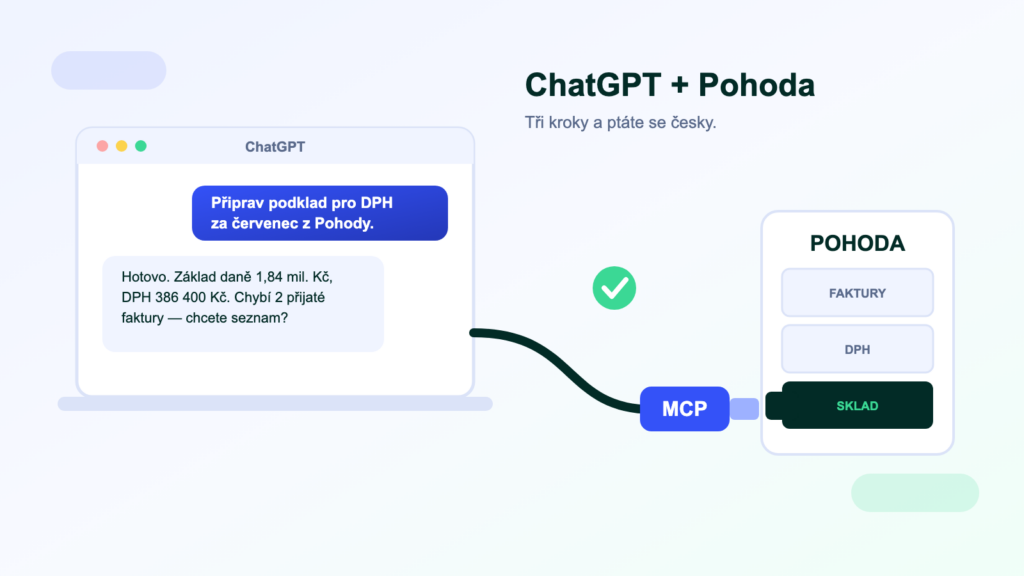
ChatGPT is great at writing, calculating and advising — but it doesn’t know your accounts. Ask it about unpaid invoices and it will answer with generalities, because it cannot see into POHODA. The good news: connecting ChatGPT to POHODA is possible today, even without a developer. In this guide we walk through the three possible routes, what you need for each and what to watch out for.
What you will need
- A ChatGPT business accountIn ChatGPT you add a custom MCP server in developer mode, available on the Business (formerly Team), Enterprise and Edu plans. Business plans also come with the assurance that models are not trained on your conversations.
- POHODA with data accessFor direct data reads you need the SQL or E1 edition (they run on SQL Server). For routes via the XML interface, count on mServer.
- An MCP server for POHODAThe intermediary that gives ChatGPT safe access to the data. What it is and how it works is explained here.
- 10 minutes of your timeConnecting a ready-made MCP server is a single configuration step in the ChatGPT settings.
Route 1: copying data by hand (free, but…)
The simplest way to start: export a report from POHODA and paste it into the chat. It works immediately and costs nothing — which is why most companies start there. But there are three catches: it is laborious (every question = a new export), the data is stale the moment you paste it, and above all you lose control over what exactly leaves for the chat. Fine for a one-off analysis; not for daily work.
Route 2: an open-source MCP server (for the technically minded)
Community MCP servers for POHODA exist on GitHub, communicating over the XML interface. They are free and fully under your control — which is also the trade-off: you need a running mServer (a dedicated POHODA instance), a machine for the server to run on, and someone to set it all up and maintain it through every POHODA update. If you have a capable IT person in-house and time to experiment, it is a legitimate way to get a feel for MCP.
Route 3: a hosted service (no installation, live in days)
The third route hands the worries over to a provider: the MCP server runs in the cloud, connects securely to your POHODA database (IP whitelisting or your VPN), and all you do is link ChatGPT. That is how our POHODA MCP works — reads go straight from the database, so you don’t need mServer, and the connection takes three steps:
- Turn on Developer mode in your ChatGPT settings and add a custom MCP server.
- Paste the MCP server address (e.g.
https://mcp.symmy.ai/pohoda) and sign in — it uses OAuth, no shared keys and no POHODA passwords. - Ask in plain language. “Which customers have overdue invoices?” — ChatGPT fetches the data itself and answers with the numbers from your POHODA.
What you can do with the connection
- Accounting agenda“Prepare the documentation for the July VAT return.” “Which received invoices are due this week?”
- Money overview“What does the 30-day cash-flow outlook look like?” “Who owes us the most, and for how long?”
- Sales“What has company ABC ordered this year?” “Give me a customer summary before the meeting.”
- Warehouse“Which items are below minimum stock?” “How many units of XY do we have reserved?”
Security: what to ask before letting AI near your data
Whichever route you choose apart from manual copying, insist on answers to four questions: Does the connection run read-only by default? Can you restrict the areas the AI can see (payroll never, for example)? Is there an audit log of every query? And where does the data live — does it stay in the EU, and is it kept out of model training? A serious solution answers yes four times.
Don’t confuse the two: a “GPT advisor” is not a data connection
In the GPT catalogue you will also find “POHODA guide”-style assistants. They can help you operate the program — explain where to find a report or how to post a document. But they cannot see your data: they won’t tell you who owes what, nor prepare your VAT documentation. For that you need a real connection via MCP — which is what this article is about.
Frequently asked questions
Does the same work with Claude or Copilot?
Yes — MCP is an open standard, so one MCP server works with every assistant that supports it. Claude connects in much the same way (connectors in the settings); Microsoft Copilot support is on its way.
Do I need mServer?
Not for reading data — the hosted service reads directly from the database of the SQL/E1 editions. mServer comes into play for writes (issuing an invoice) and for the open-source route, which communicates through it. Details in our mServer article.
Will OpenAI see my accounts?
ChatGPT only receives the data the MCP server returns for a specific query — never the whole database. On the business plans (Business/Enterprise), conversations are not used to train models. The MCP server itself should run in the EU and store no data; ask your provider about that.
What does it all cost?
You pay the ChatGPT subscription to OpenAI. Our hosted MCP server for POHODA starts at 2 490 Kč per month per company — see the current pricing and what it includes on the POHODA MCP page.
Was this article helpful?
Thanks for the feedback!