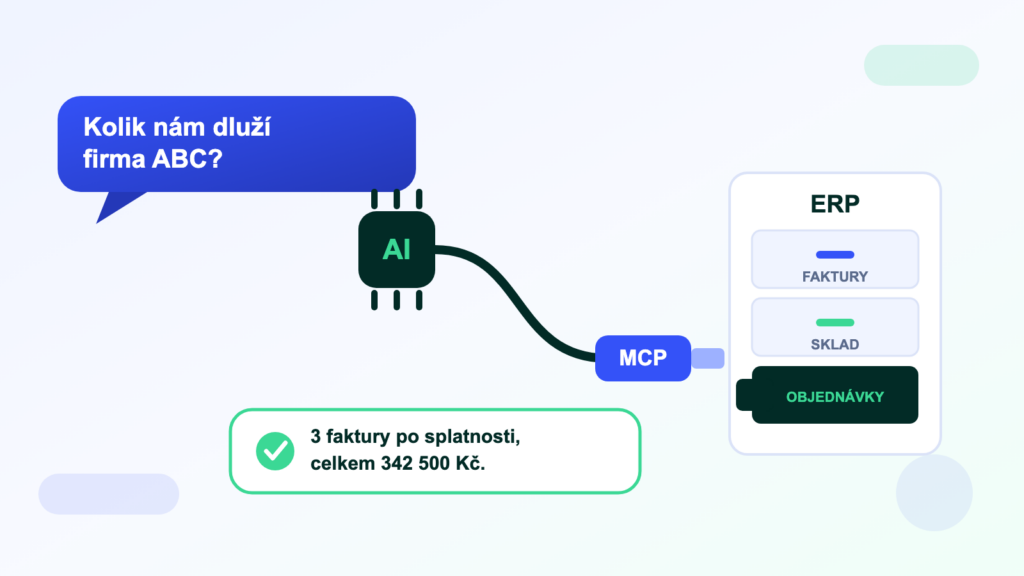
Over the past year, MCP has been popping up everywhere AI adoption is discussed. Tech media write about it, the biggest AI players — Anthropic, OpenAI and Microsoft — stand behind it, and it is starting to make its way into the world of business systems. And amid all of that stands the question most managing directors and IT admins are asking: what actually is it, and what will it do for us? You will find the answer below — no technical jargon, with real-world examples from Czech companies.
What is an MCP server?
An MCP server is an intermediary that gives an AI assistant (Claude, ChatGPT and others) secure access to the data in your business systems — so you can simply ask questions about your own data in plain language.
MCP stands for Model Context Protocol — an open standard introduced in late 2024 by Anthropic (the maker of the Claude AI assistant) and since adopted by OpenAI (ChatGPT) and Microsoft. Think of it as a USB port for artificial intelligence: one standardised way to “plug” your accounting, warehouse, CRM or anything else into an AI.
The problem MCP solves
AI assistants are great with text, but they don’t know your company data. Ask ChatGPT “How much does company ABC owe us?” and it has no way of finding out — your invoices live in POHODA, Helios or another ERP the AI cannot see into.
Before MCP, there were two inconvenient workarounds: copying data into the chat by hand (slow and risky), or building a bespoke integration for every system and every assistant separately (expensive). MCP replaces both: one MCP server for your ERP works with every AI assistant that supports the standard.
How it works in practice
- The MCP server connects to your system — the ERP database, for example — and offers the AI a set of “tools”: find overdue invoices, check stock levels, list a customer’s orders…
- The AI assistant calls a tool whenever you ask a question. “Which customers have overdue invoices above 100 000 Kč?” gets translated into an ERP query, and the AI receives real data back.
- You get the answer in the chat — in plain language, with context, often with a suggested next step (“shall I prepare payment reminders?”).
Importantly, a well-designed MCP server only grants the AI the permissions you decide on. It typically starts in read-only mode — the AI can ask questions but cannot change anything. Write actions (issuing an invoice, creating an order) are enabled separately, and every one of them is confirmed by a human.
What MCP can do for your business
- Accountant“Prepare the documentation for the July VAT return.” — instead of an hour of clicking through reports.
- Managing director“What does the cash-flow outlook for the next 30 days look like?” — an instant answer, even from a phone, no ERP access needed.
- Sales rep“What has company ABC ordered from us this year, and how do they pay?” — the full customer history before a meeting.
- Warehouse manager“Which items are below minimum stock?” — without opening the stock module.
The common denominator: answers from your ERP without exports, reports or window-switching. AI becomes a layer on top of the system that anyone who can write a sentence can use.
What MCP is not (and when you need something else)
An MCP server covers the situation where a person asks the system a question. It does not cover the situation where two systems need to exchange data automatically — say, when an e-shop order should flow into the ERP on its own and stock levels should update themselves. That is classic system integration, running continuously in the background with no human involved.
In practice the two complement each other beautifully: integration keeps data flowing between systems automatically — and MCP gives you a companion on top of that data who can answer anything.
How to get an MCP server for your ERP
There are essentially three options:
- An official MCP from the system’s maker — still a rarity. Among global players, Microsoft offers one for Dynamics 365, for example; the vast majority of Czech ERPs have no official MCP.
- Open-source projects — community MCP servers exist on GitHub for some systems. They are free, but you install and maintain them yourself, including security and updates after every ERP upgrade.
- A hosted service — an MCP server run by a specialised provider: nothing to install on your side, with managed permissions, an audit log and support. This is the route we offer at Symmy for POHODA, Money ERP, Helios iNuvio, KARAT, ABRA Flexi, ABRA Gen and Odoo — see the overview on the MCP servers for ERP page.
Frequently asked questions
Do I need a developer to use MCP?
No. Connecting a ready-made MCP server to Claude or ChatGPT is a single configuration step (copying an address and signing in). Programming is only needed if you are building the MCP server yourself.
Is it safe to give AI access to company data?
It depends on the setup. Ask your provider three things: whether the solution runs in read-only mode, whether access can be restricted by area (e.g. payroll never), and whether every query is written to an audit log. A serious solution also never uses your data to train AI models.
Do I need a paid AI subscription?
For day-to-day business use, yes — e.g. Claude Pro or Team; in ChatGPT, custom MCP servers are available on the Business, Enterprise and Edu plans. You pay the subscription directly to the AI provider, and it covers everything else you do with the AI as well.
Does it work with Czech data and in Czech?
Yes. Modern AI assistants read and write Czech fluently — and handle Czech ERP data with ease. You can ask your question in Czech, English or German and you will get the answer in the same language.
Was this article helpful?
Thanks for the feedback!