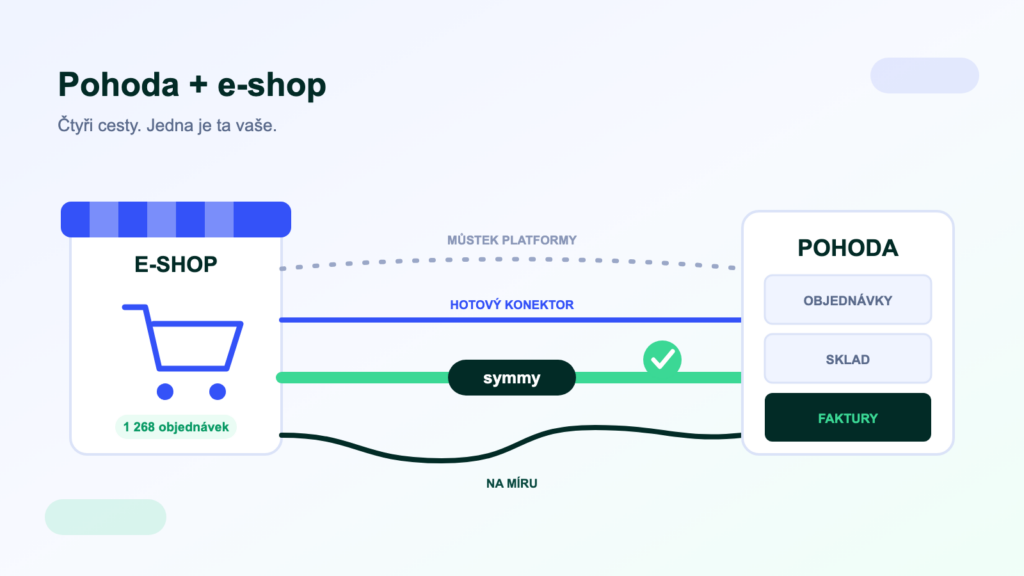
Connecting an e-shop to POHODA is the most common integration in Czech e-commerce — and also the most common source of frustration. Orders get retyped by hand, the stock shown on the website doesn’t match reality, and invoicing catches up with the weekend rush on Monday evening. There are four solutions, each suited to a different stage of growth. This guide will help you choose right the first time.
What gets synchronised between the e-shop and POHODA
Connecting POHODA to an e-shop means the automatic transfer of orders, stock levels, prices and invoices. Four routes lead there — the platform’s native bridge, a ready-made connector, an integration platform and a bespoke integration. They differ in price, agenda coverage and reliability in operation.
Before you start choosing a tool, write down what exactly should flow and in which direction:
- OrdersE-shop → POHODA. The foundation of everything — including payments, shipping and correct VAT rate assignment.
- Stock and availabilityPOHODA → e-shop. Live stock levels on the website prevent selling goods you don’t have.
- Products and pricesUsually POHODA → e-shop; the master can also be the e-shop or a PIM — the important thing is to decide up front.
- Invoices and statusesPOHODA → e-shop and the customer: invoicing, dispatch statuses, tracking numbers.
Route 1: the e-shop platform’s native bridge
Shoptet, Upgates and other platforms offer their own POHODA add-on. The advantages are clear: the fastest start and a price in the hundreds of Kč per month. The limits arrive with growth, though — the bridge covers only selected agendas of a single platform, runs on its own schedule, and when a transfer gets stuck, you usually hear about it from a customer. For a young e-shop with dozens of orders a day it is still a sensible first choice.
Route 2: a ready-made third-party connector
Specialised bridges and connectors from independent vendors cover more agendas and often more platforms. They make sense when the native add-on is no longer enough but you don’t yet want to approach integration strategically. Watch out for two things: who keeps the connector alive when POHODA or mServer changes — and what support looks like when a transfer crashes at midnight.
Route 3: an integration platform
A platform like Symmy connects your e-shop to POHODA just like a connector does — but on top of that it adds monitoring, queues, retries on error and, above all, room to scale: carriers, a CRM, a marketplace or a second e-shop plug into the same infrastructure without a new project. It pays off the moment the e-shop is just one of several systems that need to talk to POHODA. You will find specific combinations in our catalogue — for example Shoptet + POHODA or WooCommerce.
Route 4: bespoke integration
Custom development on top of mServer or the database gives you full control and makes sense for large volumes and heavily non-standard processes. But it is the most expensive route — from tens of thousands of Kč for a simple scenario to hundreds of thousands — and development is not the end of it: every change to POHODA, the platform or legislation means maintenance someone has to do.
Comparing the four routes
| Route | Deployment | Indicative price | When to choose it |
|---|---|---|---|
| Platform bridge | hours | hundreds of Kč/month | a young e-shop, basic agendas |
| Ready-made connector | days | hundreds to thousands of Kč/month | more agendas, one pair of systems |
| Integration platform | days to two weeks | implementation + thousands of Kč/month | multiple systems, need for monitoring |
| Bespoke | weeks | tens to hundreds of thousands of Kč | large volumes, non-standard processes |
How it works under the bonnet
mServer, XML, or direct database reads?
Most connectors talk to POHODA via mServer — the official XML interface. With the SQL and E1 editions, stock levels and other data can be read straight from the database, which is faster and puts no load on POHODA. Writes (creating an order, issuing an invoice), however, always belong in the official interface. We cover the wider context in our guide to ERP integration.
Three steps if you’re not sure
- Write down your agendas and volumes. What should be synchronised, how many orders a day, how many stock items — the choice is driven by scope, not by brand names.
- Check the native bridge’s limits. Does it cover your list? Then don’t look for anything more complex — an upgrade only makes sense once you hit a wall.
- If you’re planning to grow, ask for a comparison. Carriers, marketplaces, CRM, a second warehouse? Get in touch — we’ll go through your agendas with you and propose a route that will last.
Frequently asked questions
What does connecting POHODA to an e-shop cost?
A native bridge costs hundreds of Kč per month, ready-made connectors hundreds to thousands, an integration platform a one-off implementation plus thousands per month, and bespoke development tens to hundreds of thousands. The deciding factors are the number of agendas and two-way flows — not company size.
How long does the connection take?
With a ready-made connector or a platform, days to two weeks. It isn’t the technology that takes most of the time, but aligning the code lists: product codes, VAT rates, customer matching.
Does the connection work with POHODA without SQL?
Yes — all POHODA editions work via mServer (XML communication). Direct database reads, which speed up stock synchronisation and reporting, require the SQL or E1 edition.
Can it handle Shoptet, WooCommerce and Shopify?
Yes. We support Shoptet, WooCommerce, Shopify, Upgates and other platforms — each with an overview of supported agendas on its detail page.
What about marketplaces like Allegro or Alza?
Marketplace orders flow into POHODA on the same principles — either through tools like Base (formerly BaseLinker) or directly via an integration platform. The platform’s advantage: marketplaces, the e-shop and carriers share the same infrastructure and the same monitoring.
Was this article helpful?
Thanks for the feedback!