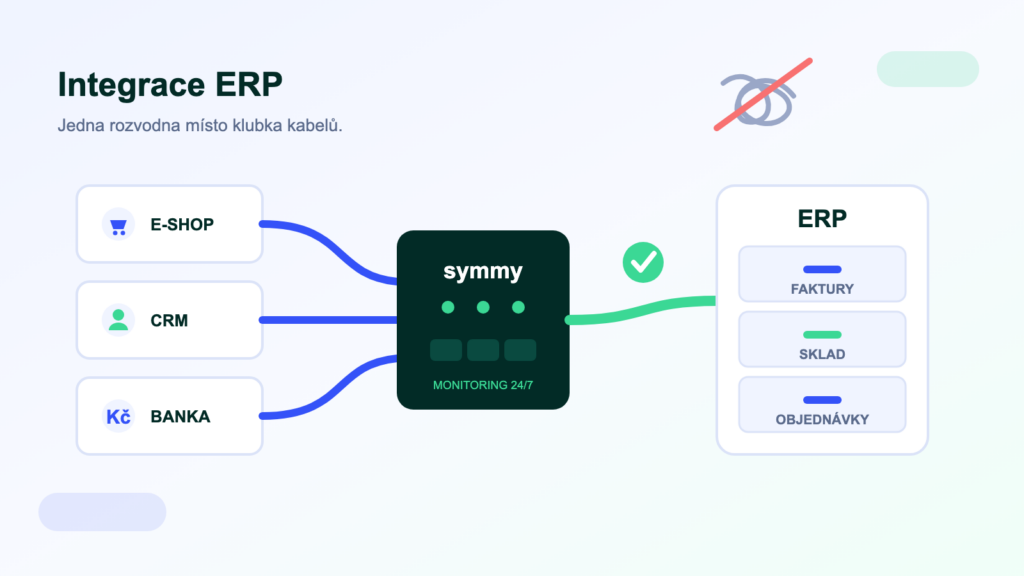
Business systems don’t talk to each other on their own. The e-shop doesn’t know what’s in stock, the sales rep can’t see invoices, and the accountant retypes orders by hand — in the evening, with mistakes. That is exactly what ERP integration solves. In this guide we cover what integration involves, the four routes that lead to it, what a typical project looks like, what it costs and which mistakes to avoid.
What is ERP system integration?
ERP integration is the automatic exchange of data between a business system (POHODA, Money, Helios, ABRA…) and other applications — an e-shop, CRM, bank or warehouse. Orders, invoices and stock levels travel between the systems on their own: no retyping, no errors, always up to date.
The ERP is the heart of the company — it runs the accounts, the warehouse and the invoicing. But a whole ecosystem gradually grows up around it: e-shop, CRM, POS systems, carriers, banks, reporting tools. Each of them holds a piece of the truth about customers and money, and until they are connected, people carry the data between them. Integration means the systems hand data to each other themselves — by clear rules and with error checking.
In practice, three situations come up most often:
- E-shop and warehouseAn e-shop order lands in the ERP by itself, the customer sees live product availability, and the invoice goes out after dispatch — without a single manual step.
- CRM and accountingThe sales rep sees a customer’s invoices and payment behaviour right in the CRM (say, Raynet) without needing access to the accounts.
- Reporting and AIERP data flows automatically into overviews and dashboards — and now you can also ask an AI assistant about it in plain language.
Four ways to connect systems
Whatever the brief, technically it always comes down to one of four routes. They differ in deployment speed, price and how well they hold up in day-to-day operation.
- APIs and web servicesThe systems’ official machine interfaces — mServer for POHODA, the REST API for ABRA Flexi. The cleanest route for writing data; the limits tend to be speed, feature coverage and sometimes licensing terms.
- Direct database readsFor reading (reporting, stock-level sync, AI queries) it is often fastest to go straight to the ERP’s SQL database. No paid add-ons needed and no load on the application — but writes never, ever go into the database.
- File exchangeXML or CSV exports and imports. The oldest route, works almost everywhere — but it is fragile: there is no feedback, and errors surface late.
- Integration platform (iPaaS)A layer between the systems that uses the previous three routes internally and adds what matters on top: ready-made connectors, field mapping, queues, monitoring and retries on error.
A one-off bridge, or an integration platform?
The most common dilemma isn’t “which API” but “who builds it and who will look after it”. A bespoke bridge — a script moving data from point A to point B — is quick and cheap to acquire. But integration isn’t a project that ends one day; it is a service that has to run every single day.
A bridge is only cheap until the first change
It works right up until the API, the data format or the ERP version changes. Then comes the question: who fixes it — and how quickly will you even notice? An integration platform carries the monitoring, notifications and queues for you. To be fair, though: if you are connecting two systems in one direction and have your own developer, a bridge will do. Three or more systems, two-way flows, or nobody to watch over the operation — that is a job for a platform.
How an integration project runs
Good news: integration is no longer a months-long IT project. With ready-made connectors we are talking days to two weeks; with bespoke solutions, weeks. The process is always similar:
- Agenda analysis. What should be synchronised (orders, invoices, stock…), in which direction, and which system is the “master” for which data.
- Field mapping. What the items are called in each system. This is where most surprises come to light: VAT rates, units of measure, customer matching.
- Connection and configuration. Getting the connectors and access up and running (API keys, IP whitelisting), setting up data transformations.
- Test run. Edge cases are verified on a sample of data — cancellations, partial dispatches, foreign currencies, duplicate customers.
- Live operation with monitoring. Go-live plus ongoing monitoring of errors and queues. An integration nobody monitors is just a postponed outage.
What ERP integration costs
Prices span a wide range, and scope is the main driver:
- An e-shop platform’s native bridge — typically hundreds of Kč per month. The cheapest start, covering only the basic agendas of a single platform.
- An integration platform — a one-off implementation priced by the number of agendas, plus monthly operation in the low thousands of Kč; monitoring and connector maintenance are included.
- Bespoke integration — from tens to hundreds of thousands of Kč for development, plus ongoing maintenance costs every time either system changes.
The price is driven up by the number of connected agendas, two-way flows, non-standard processes and data quality. For your specific combination of systems, we will prepare a quote.
The most common mistakes
- No “master”. When it isn’t clear which system is the authority for a given field, the systems overwrite each other’s data and nobody knows what to trust.
- Synchronising everything. Every extra agenda means extra complexity. Integrate what the business needs, not everything that can technically be transferred.
- No monitoring. Silence doesn’t mean the integration is running — it may just be standing still quietly. Errors must never be discovered by your customers.
- Underestimated data quality. Duplicate customers and inconsistent product codes are not fixed by integration — they are exposed by it.
What about AI? A new layer on top of integrations
Integration has historically meant connecting system to system. Since 2025 there has been a third participant: the AI assistant. Thanks to the MCP standard, Claude or ChatGPT can connect directly to the ERP and answer questions over live data — “how much does company ABC owe us?” or “prepare the VAT documentation”. MCP doesn’t replace classic integrations, it complements them: integrations keep data flowing between systems, MCP answers people. What it is and how it works is explained in a separate article.
Frequently asked questions
Can an ERP without an API be integrated?
Usually yes. Where an API is missing, file exchange or direct database reads step in — with certain limitations in older editions (POHODA without SQL, for example). This is exactly where an integration platform proves useful, since it can combine several routes at once.
How long does connecting an ERP to an e-shop take?
With a ready-made connector, days to two weeks including testing; bespoke builds usually take a few weeks. Most of the time typically goes into aligning code lists and mapping fields, not the programming itself.
What if the ERP version or its API changes?
Someone has to adapt the connector. With a bespoke bridge that is your developer; with an integration platform it is the provider — connector maintenance is part of the service. Ask this question before signing the contract, not after the first broken update.
Is reading directly from the ERP database safe?
For reads, yes — with a dedicated account, rights limited to the necessary tables and a secured connection. Writes belong exclusively in the official interfaces (for POHODA that is mServer) so they pass the application’s validations.
Bridge or platform — how to decide?
A simple rule: two systems, one direction and your own developer → a bridge will hold up. Three or more systems, two-way flows, or nobody to maintain it → an integration platform pays for itself in reliability and time saved.
Was this article helpful?
Thanks for the feedback!