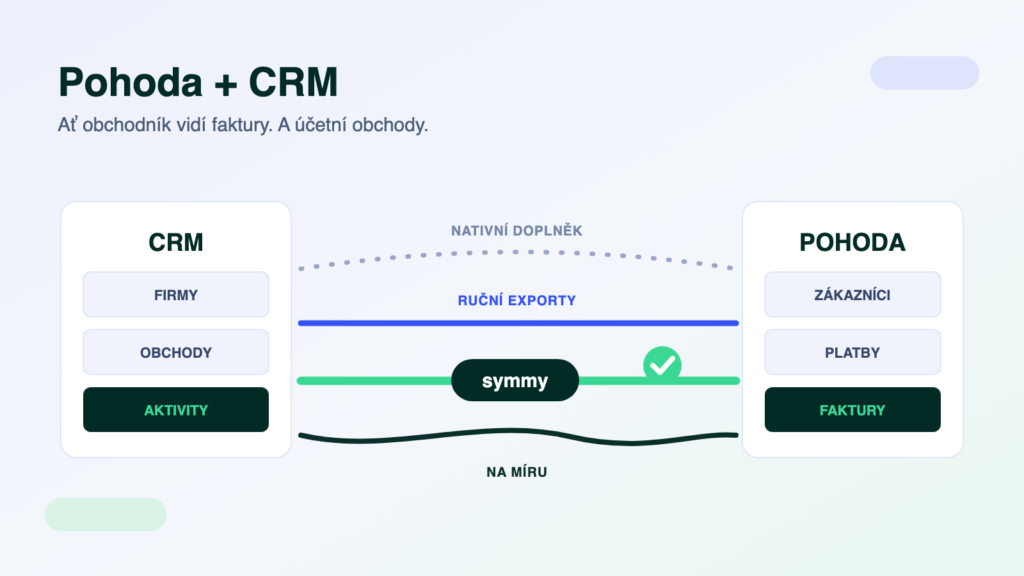
The sales team lives in a CRM — Raynet, Pipedrive or HubSpot. The accountant lives in POHODA. And in between, things get retyped: a new customer entered into the accounts by hand, an issued invoice attached to a contact by hand, the state of receivables found out by shouting across the office. This article sums up what can be transferred between a CRM and POHODA automatically, the four connection routes that exist, and how to choose between them.
The short answer
POHODA can always be connected to a CRM — it has an open XML interface that can read and write all the agendas that matter. The choice is between a native CRM add-on (quick, but what it does is all it does), manual synchronisation via exports (free, but somebody has to keep doing it), DIY automation (Make/Zapier — which runs into mServer) and an integration platform (built to fit, monitored, two-way). The more agendas and the more people working with the systems, the sooner the last route pays off.
What flows between the CRM and POHODA
- Customers and contactsA new company in the CRM is created as an address book entry in POHODA — with its company ID (IČO), VAT number and billing address. Two-way: a change of billing details in the accounts flows back to the salesperson.
- Invoices and receivablesInvoices issued in POHODA show up against the customer in the CRM, payment status included. The salesperson can see who not to call with a new offer while they still owe money.
- Products and price listsStock cards and prices from POHODA as the basis for quotes in the CRM — so quotes are no longer built on stale prices.
- Deals and ordersA won opportunity in the CRM turns into a received order or job in POHODA — without retyping the line items.
The four connection routes
- A native CRM add-on. Some CRMs offer a POHODA connector straight from their add-on marketplace. The upside: quick to switch on. The limit: it transfers only what the maker planned for, usually one-way and at a fixed interval — and editions outside the SQL/E1 range tend to be a problem.
- Manual exports and imports. POHODA can do XML export/import, CRMs usually CSV. Free and dependency-free, but somebody has to run the synchronisation regularly — and the day it gets forgotten is the day a salesperson calls a debtor with a new offer.
- DIY automation (Make, Zapier, n8n). Works brilliantly on the CRM side, hits a wall on the POHODA side: mServer runs on your premises (there is no public cloud API) and no official connector exists. We took this apart in detail in Make, Zapier, n8n and POHODA.
- An integration platform. A connection built to fit the agendas you choose, two-way, with monitoring and validation of every transfer. Built per agenda (usually 6–12 hours of work each), then it runs by itself. You’ll find the pair in our integration catalogue — for example Raynet + POHODA E1.
POHODA specifics to plan for
POHODA communicates through an XML interface; for continuous synchronisation you use mServer — an HTTP server that ships with every POHODA, but runs on your machine and needs to be operated properly. With the SQL and E1 editions you can also read directly from the database, which supports more frequent synchronisation and larger volumes. The editions also differ in how many parallel connections they can handle — which is what the choice of synchronisation interval rests on.
The most common case: Raynet + POHODA
The Czech combination we build most often: Raynet as the CRM, POHODA as the accounts. The address book and receivables flow both ways, won deals turn into orders. And if the team lives in its calendar, we also synchronise Raynet with Outlook — meetings, edits and cancellations in both directions.
One trap: duplicate customers
The most common source of confusion in practice. The salesperson creates “Novák s.r.o.”, the accountant’s address book has “NOVÁK, spol. s r. o.” — and an integration without rules produces a third record. The fix is to match by company ID (IČO), not by name, and to decide which system is the authority for which field (billing details live in the accounts, business contacts in the CRM). This rule is the first thing we set up on every integration.
Frequently asked questions
How much does connecting POHODA to a CRM cost?
With an integration platform, the price follows the number of agendas — a basic connection of one agenda comes to 6–12 hours of work depending on type, with the exact scope pinned down after an initial meeting. Native add-ons tend to carry a monthly fee; manual synchronisation costs the time of whoever does it.
Does the connection work both ways?
With an integration platform, yes — each agenda has its own direction and interval. Typically: customers two-way, invoices from POHODA into the CRM, orders from the CRM into POHODA. Native add-ons tend to be one-way.
Do I have to buy mServer for the integration?
mServer is not a separate product — it ships with every POHODA. It does, however, need to be set up on your premises and kept running; we help with that. With the SQL and E1 editions we can also handle part of the transfers directly through the database.
I use a CRM other than Raynet — does that work too?
Yes. The approach is the same for any CRM with an API (Pipedrive, HubSpot and others) — only the CRM side changes, the POHODA side stays. You’ll find the combinations in our integration catalogue.
Was this article helpful?
Thanks for the feedback!