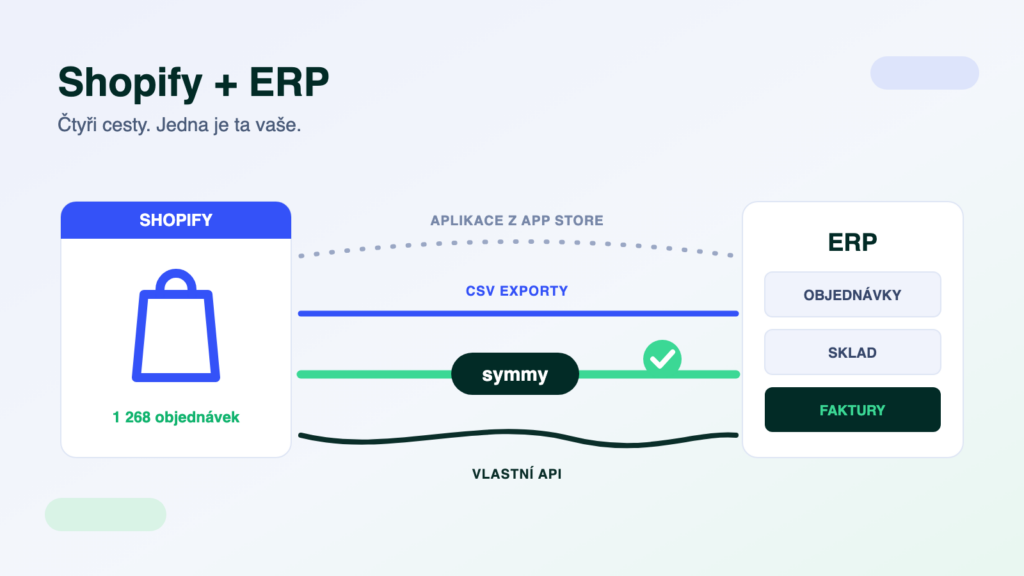
Shopify is the world’s largest e-commerce platform, and more and more Czech and Slovak shops run on it — often the ones selling abroad. Sooner or later they all hit the same moment: orders need to get into the accounting system or ERP, and stock levels need to flow back. There are four ways to connect Shopify to an ERP. The good news: unlike the local Czech platforms, Shopify has an open API. The catch: the success of the integration is decided by the other side — how well the solution understands your ERP, its documents and VAT.
The short answer
For a standard scenario with a widespread ERP, start with a ready-made app or a connector from a specialised company — for pairs like Shopify × POHODA they exist and work out of the box. You need an integration platform as soon as data has to be transformed on the way, you are connecting a third system (warehouse, CRM, carrier), or your dispatch depends on the transfers. Treat CSV exports as a temporary fix, and a custom API build only if somebody will maintain it long-term.
What Shopify exposes to the outside world
Technically, Shopify is the most open platform you can choose for an e-shop: it has a public Admin API (today primarily GraphQL), every shop can create its own custom app with an access token right in the admin, it announces events via webhooks (new order, stock change), and on top of that there is a huge App Store and native CSV exports and imports. That sets it apart from Czech platforms like Shoptet, where the API is partner-only — we compared the two in a separate article. But openness solves only half the task: the API gives you the orders, yet somebody has to understand them on the ERP side — editions, modules, documents, VAT.
Route 1: A ready-made app or connector
The App Store holds thousands of apps, but the global ones don’t know Czech and Slovak ERP systems. Fortunately, connectors from specialised companies exist — typically for pairs like Shopify × POHODA or Money S3. Deployment is quick, you pay a monthly fee and the standard scenario (orders into the ERP, stock and prices back) works out of the box. The limit is the same as with every ready-made solution: fixed mapping. Unit conversions, code matching, splitting documents by VAT or a third system are beyond it — and every additional app in the shop is another separate thing to manage, with its own (often non-existent) logs.
Route 2: CSV exports and imports
Shopify can export orders to CSV and import products from CSV without any app at all. For a few orders a day that is enough — the accountant downloads a file once a day and processes it in the ERP. But the whole process depends on a person: a forgotten export means missing documents, a changed file structure means a silently broken import. There is no feedback loop (order statuses, stock movements), and as volume grows, so does the room for human error. A good start, a bad permanent state.
Route 3: A custom API build (and Make or Zapier)
Thanks to the open API you can build the connection yourself — with your own script, or in tools like Make and Zapier, which have official Shopify connectors. The Shopify side works beautifully; you will get stuck on the ERP side. General automation platforms don’t know Czech and Slovak ERP systems (you won’t find POHODA, Money or Helios in them), so you end up building that half by hand anyway — and a custom script needs an owner: watching API changes, rate limits, error states and documents that fail validation in the ERP. What DIY automation can and cannot handle is covered in our POHODA case study.
Route 4: An integration platform
A platform connects to Shopify through the API like a custom app — but it already has both sides built: a connector to Shopify and to your ERP. It transforms the data on the way (codes, units, item matching), validates it before writing, queues transfers with automatic retries on outages, and you learn about errors from a notification, not from a customer. With a third system (warehouse, CRM, carrier) the difference deepens: it connects with one connector into the same hub. When each architecture pays off is covered in our article on integration platforms.
- AppA fixed scenario out of the box. Deployed in hours, a monthly fee, no mapping changes.
- PlatformTailored mapping: transformations, matching, validation. Deployed in days, priced per module.
- Custom buildMaximum freedom — and a permanent commitment: maintenance, API limits, error states, developer holidays.
- CSV exportsFree and immediate. Depends on a person, no feedback loop, doesn’t scale.
An ERP for Shopify: what gets connected most often
Smaller e-shops most often connect POHODA or Money S3, growing companies ABRA Flexi or Helios iNuvio, and larger operations Microsoft Business Central. Since Shopify is typically chosen by shops selling abroad, also look at multi-currency documents and the EU OSS scheme when picking an ERP — and above all at integrability: what interface the ERP has, how fast it handles stock movements and whether a proven connection exists for your combination. All supported pairs are listed in the integration catalogue.
What to check before signing
- Who issues the invoices. Shopify by itself does not issue Czech or Slovak tax documents. Either the ERP creates them from the transferred orders (cleaner), or an invoicing app inside Shopify does — in which case make sure documents don’t get created twice.
- VAT, currencies and OSS. Selling into the EU means country-specific rates and the OSS scheme, plus multi-currency orders and rounding. Have them show you exactly how VAT and currency land in the ERP document.
- Payment reconciliation. Payment gateways send money in batches, with fees deducted — the amount on the bank account doesn’t match the orders. Ask how the solution matches payouts to documents; manual reconciliation is a silent time sink for accountants.
- Variants and SKUs. Shopify works with product variants, the ERP with item codes. Have the 1:1 SKU mapping demonstrated — mismatched variants are the most common source of stock differences.
- Stock, statuses and tracking back. Stock sync frequency decides the game with last pieces and multiple channels; order statuses and parcel numbers must flow back into Shopify, otherwise customers write to support.
A trap: an open API is not a finished integration
“Shopify has an API, we’ll wire it up in an afternoon.” Half true: in an afternoon you will get orders out of the API. The rest of the project is the other side — which ERP module the document belongs to, how your edition behaves, what to do with an order in a foreign currency, what happens to a document that fails validation, and who finds out the transfer stopped overnight. The price of an integration isn’t made by downloading data, but by delivering it correctly and under supervision.
How we do it at Symmy
Symmy is a cloud integration platform built for Czech and Slovak ERP systems. It connects to Shopify through its API, automatically monitors, transforms and validates the data between the e-shop and the ERP, and operations run under 24/7 supervision. The build is priced per module (usually 6–12 hours of work per module), so you pay for the flows you actually need. Everything we can transfer with Shopify is on the Shopify detail page; the pricing page with an online calculator gives you an indicative price for your combination.
Frequently asked questions
How do I get orders from Shopify into ABRA Flexi?
Three realistic options: manually via CSV export (a temporary fix), with a custom script over both systems’ APIs (ABRA Flexi has a REST API, but somebody has to maintain the script), or with an integration platform that has both connectors ready — it transfers orders automatically, matches items via SKU and returns statuses to Shopify. The details are on the Shopify × ABRA Flexi page.
Does Shopify have a public API?
Yes — the Admin API (primarily GraphQL) plus webhooks. You create a custom app with an access token right in the shop admin. That sets Shopify apart from platforms like Shoptet, where the API is partner-only. An open API, however, solves only the e-shop side — the other half of any integration is always the ERP.
How much does connecting Shopify to an ERP cost?
A ready-made app runs from a few to tens of euros a month. A platform integration is priced per module — the build usually takes 6–12 hours of work per module, plus a monthly operations fee. The online calculator prices your specific pair of systems.
Can Make or Zapier handle it?
The Shopify side, yes — official connectors are there. You will get stuck on the ERP side: these platforms don’t know POHODA, Money or Helios, so you build the ERP half by hand anyway, without queues or validation. Great for notifications and marketing, not for accounting documents — see our POHODA case study.
What about invoices and VAT when selling abroad?
Shopify handles VAT rates at checkout, but tax documents and returns are the job of your ERP or accounting system. The integration must carry the order over including country, rate and currency so the ERP issues the correct document — OSS scheme included. This is exactly where global apps without local-legislation knowledge break down.
Was this article helpful?
Thanks for the feedback!