“Is a simple bridge enough, or do we need an integration platform?” The term integration platform shows up in vendor offers and means something different every time — from an e-shop add-on to an enterprise service bus costing millions. This article compares both approaches without the sales fog: what an integration platform really is, when it is overkill and how to tell the moment has come.
The short answer
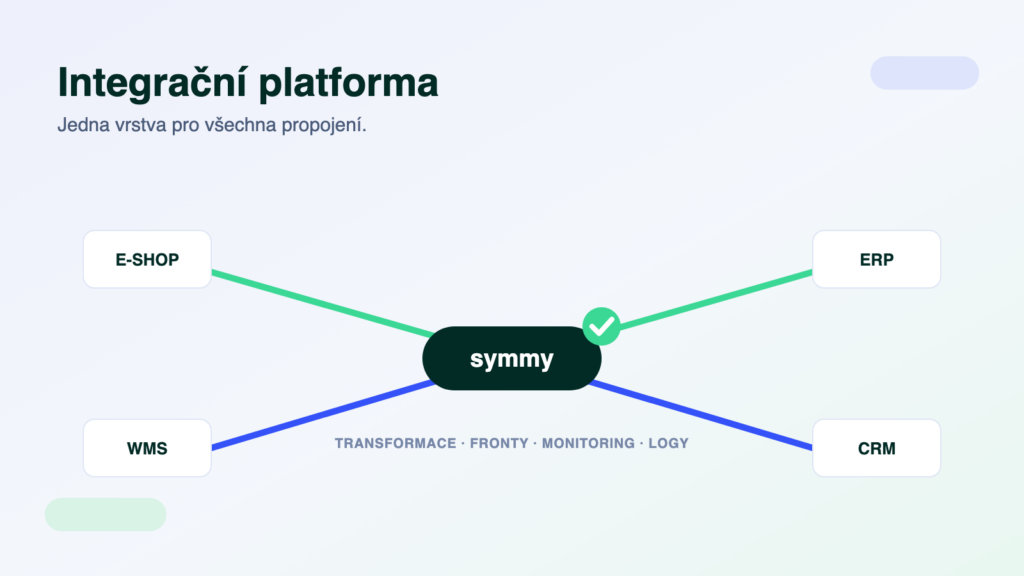
An integration platform is a separate layer between your systems that handles data transfer, transformation and monitoring in one place — one log, one dashboard, any number of connected systems. A bridge is a single-purpose connection between two specific systems with a fixed scenario. For one data flow between two systems a bridge is cheaper and faster; once you run three or more systems, need to transform data on the way or your operations depend on the transfers, a platform is more reliable and cheaper to manage.
A bridge: the shortest path between two systems
A bridge (connector, add-on) links exactly two systems in exactly one scenario — typically orders from the e-shop into the ERP and stock levels back. Field mapping is fixed, deployment is quick and the price is low; for standard pairs it is often offered by the e-shop or ERP vendor themselves. That is its strength and its limit: what it does is all it does. A change in mapping or a new requirement means a vendor request — and every additional bridge in the company is another separate thing to manage, with its own vendor, its own behaviour on errors and its own (often non-existent) logs.
An integration platform: one layer for all connections
A platform flips the architecture: systems no longer connect to each other pair by pair, they all connect to a single hub. The hub provides connectors to the individual systems, data transformations (different codes, units, item matching), queues with automatic retries on outages and, above all, oversight — transfers are monitored and you learn about an error from a notification, not from a customer. Adding another system means adding one connector, not rebuilding all existing connections.
- BridgeOne connection, a fixed scenario. A second flow or a third system = a new bridge, a new vendor, more management.
- PlatformMultiple systems and directions through one hub. A new system = one connector; existing connections stay untouched.
- BridgeErrors typically get fixed once somebody notices — there is no log and no alerting.
- PlatformAn outage is retried automatically from the queue, you know about errors immediately and the log lets you trace every transferred document.
When a bridge is enough
Honestly: quite often. Don’t buy a platform if all three points hold:
- Two systems, one or two flows. Orders one way, stock back — and nothing else on the horizon.
- A standard scenario without customisation. The default mapping fits; no recalculations or matching needed along the way.
- An outage can wait a while. If a transfer gets stuck, you’ll notice yourselves and an hour’s delay hurts nobody.
Five signals you need a platform
- Three or more systems. ERP + e-shop + warehouse, CRM or a carrier. The number of direct connections grows faster than linearly with each system — and so does the number of places where things can break.
- Data needs transforming on the way. Unit conversions, matching product codes, splitting documents — a bridge’s fixed mapping can’t handle that.
- Your operations depend on the transfers. When orders stop flowing, dispatch stops. Then you need monitoring, notifications and automatic retries, not a morning “did it go through?” check.
- A custom application or a system without a ready-made connector. Nobody sells a bridge for your in-house app; a platform connects over its API.
- You need to prove what was transferred. Complaints, audits, hunting for differences between systems — without logs you argue, with logs you look it up.
What about Make, Zapier or n8n?
Those are integration platforms too — general-purpose ones. They are great for marketing automation and notifications; with accounting documents you will run into the fact that none of them knows Czech and Slovak ERP systems, their documents, editions and validations. We compared the general and the specialised approach using POHODA as the example — in short: fine for a prototype, not for the company’s backbone.
A trap: “platform” in an offer means nothing by itself
Everybody writes platform into their offers these days. Four questions cut through it: What exactly happens when a transfer fails? (the right answer includes a queue, retries and a notification) Where do I see the log of transferred documents? Who watches the operation — you or us? What will adding another system cost in a year? Whoever answers concretely actually has a platform.
How we do it at Symmy
Symmy is a cloud integration platform built for Czech and Slovak ERP systems: it automatically monitors, transforms and validates data between systems, operations run under 24/7 supervision and the build is priced per module (usually 6–12 hours of work per module), so you pay for the flows you actually need. Supported pairs are listed in the integration catalogue; how the whole discipline works is covered by the complete ERP integration guide.
Frequently asked questions
Is an “integration platform” the same thing as iPaaS?
Yes, iPaaS (integration Platform as a Service) is the industry term for a cloud integration platform. In practice you distinguish general iPaaS (Make, Zapier, n8n) from specialised platforms that know a specific domain — in our case Czech and Slovak ERP systems and their documents.
How much does an integration platform cost?
You don’t pay for “software”, you pay for the flows that get built and for operation. With us the build is priced per module (usually 6–12 hours per module) and operation is a monthly fee — the online calculator prices your specific pair of systems. A bridge is cheaper on day one; a platform wins on management and extensibility.
Do I have to change my ERP or e-shop for a platform?
No. A platform connects to the systems you already have through their interfaces — API, XML, database. That is exactly why it makes sense where no ready-made bridge exists for your combination.
What if one of the systems goes down?
No data is lost — it waits in the queue and the transfer retries automatically until the system is back. You learn about the outage from a notification, and the log then shows that everything went through.
Won’t AI solve all of this?
No — an AI layer is great for questions over your data, but transferring documents needs a deterministic machine: same input, same output, every time. Why the two layers complement rather than compete is covered in MCP server or a classic integration.
Was this article helpful?
Thanks for the feedback!