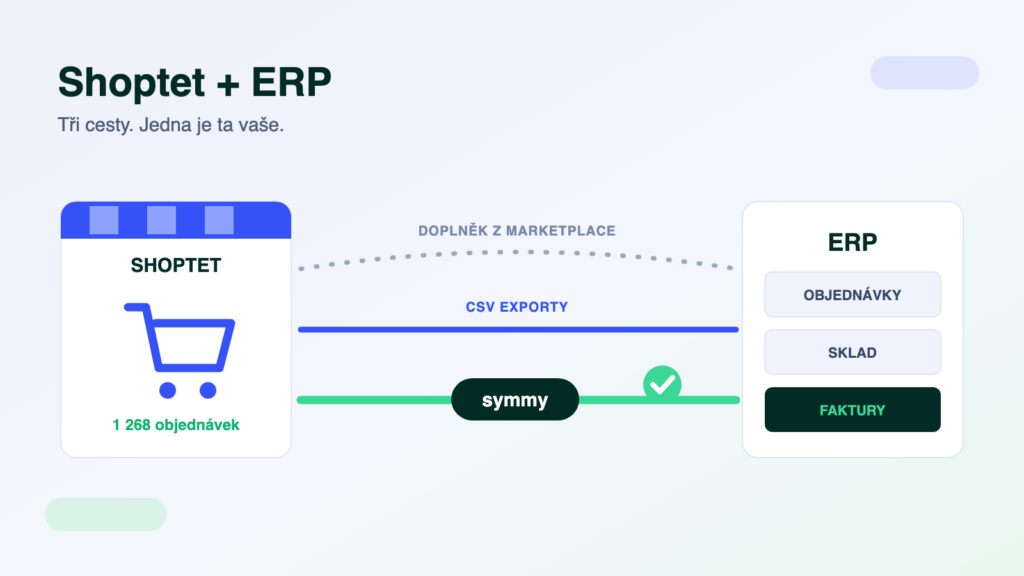
Shoptet powers tens of thousands of e-shops in the Czech Republic and Slovakia — and almost every one of them sooner or later hits the same moment: there are so many orders that retyping them into the accounting system or ERP stops scaling. There are three ways to connect Shoptet to an ERP, each suited to something different. This article compares them without the sales fog — including the things an add-on offer usually leaves out.
The short answer
For a standard scenario with a widespread ERP (POHODA, Money S3, ABRA Flexi), start with a ready-made add-on from the Shoptet marketplace — it is the fastest to deploy and the cheapest on day one. You need an integration platform as soon as data has to be transformed on the way, you are connecting a third system (warehouse, CRM, carrier), or your dispatch depends on the transfers. Treat manual exports and imports only as a temporary fix for a handful of orders a day.
What Shoptet exposes to the outside world
Shoptet offers three interfaces through which data gets in and out: add-ons from its own marketplace, a partner API and file exports/imports (XML, CSV). One important detail decides the whole architecture: Shoptet has no public API for shop owners. The API is available to registered partners who build add-ons on top of it — and your e-shop grants them access by installing the add-on. In practice this means you cannot just click together “your own API connection”; you either use a ready-made add-on, or an integrator who holds partner access. Higher Shoptet plans further extend the connection options.
Route 1: A ready-made marketplace add-on
For the most common pairs — Shoptet with POHODA, Money S3 or ABRA Flexi — ready-made add-ons exist: from ERP vendors, specialised companies and Shoptet itself. Installation takes hours, you pay a monthly fee and the standard scenario (orders into the ERP, stock and prices back) works out of the box. That is both the strength and the limit of this route: the field mapping is fixed. As soon as you need to convert units on the way, match product codes, split documents by VAT or connect a third system, the add-on can’t do it — and every additional add-on in the shop is another separate thing to manage, with its own behaviour on errors and its own (often non-existent) logs.
Route 2: File exports and imports
The oldest route: orders out as XML or CSV, price list and stock in via import. It costs nothing and is enough for a few orders a day — the accountant downloads a file once a day and imports it into the ERP. But bear in mind the whole process depends on a person: forget the export and documents go missing; change the file structure and the import fails silently. There is no feedback loop (order statuses, real-time stock movements), and as volume grows, so does the room for human error. A good start, a bad permanent state.
Route 3: An integration platform
A platform connects to Shoptet through the same partner interface as an add-on — but the mapping is not fixed. It transforms data on the way (units, codes, item matching), validates it before writing into the ERP, queues transfers with automatic retries on outages, and you learn about errors from a notification, not from a customer. The main difference shows with the third system: a warehouse (WMS), CRM or carrier connects with one connector into the same hub, whereas with add-ons you would be stacking several separate bridges next to each other. When each architecture pays off is covered in detail in our article on integration platforms.
- Add-onA fixed scenario out of the box. Deployed in hours, a monthly fee, no mapping changes.
- PlatformTailored mapping: transformations, matching, validation. Deployed in days, priced per module.
- Add-onErrors typically get fixed once somebody notices — logs and alerting are usually missing.
- PlatformAn outage is retried automatically from the queue, you know about errors immediately and every transferred document can be traced in the log.
An ERP for Shoptet: what gets connected most often
Shoptet gets along with practically every Czech ERP — the question is not “whether” but “how well for your modules”. Smaller e-shops most often connect POHODA or Money S3, growing companies ABRA Flexi or Helios iNuvio, and larger operations Microsoft Business Central. When choosing an ERP for e-commerce, look above all at integrability: what interface it has (API, XML), how fast it handles stock movements and whether a proven connection exists for your combination. All supported pairs are listed in the integration catalogue.
What to check before signing
- Product variants. Shoptet works with variants (size, colour), the ERP with item codes. Make sure they map 1:1 — mismatched variants are the most common source of stock differences.
- Who owns the data. Prices and stock should live in the ERP, orders and customers in the e-shop. When both systems edit the same field, conflicts won’t take long — have the sync direction described for each module separately.
- Stock sync frequency. An hourly sync is fine until you sell last pieces or across several channels. Ask for the shortest possible interval and what slows it down in practice.
- Order statuses back into Shoptet. Dispatched, parcel number, tracking — without the return flow, customers write to support and support digs through the ERP. The return direction tends to be the quieter half of any offer.
- What happens on an error. An order with an unknown product code, an ERP outage, a duplicate customer. The right answer includes a queue, automatic retries, a notification and a log — “try sending it again” is not the right answer.
A trap: “works with POHODA” doesn’t mean it works with your POHODA
ERP systems come in editions, and the editions differ exactly where integrations stand: POHODA Jazz, Komplet and E1 differ in mServer availability and modules, Money and Helios charge extra for interface modules. An add-on “for POHODA” may not work with your edition — always ask about your specific edition, version and the list of modules that actually get transferred.
How we do it at Symmy
Symmy is a cloud integration platform built for Czech and Slovak ERP systems. It connects to Shoptet through its API, automatically monitors, transforms and validates the data between the e-shop and the ERP, and operations run under 24/7 supervision. The build is priced per module (usually 6–12 hours of work per module), so you pay for the flows you actually need. Everything we can transfer with Shoptet is on the Shoptet detail page; the pricing page with an online calculator gives you an indicative price for your combination.
Frequently asked questions
Does Shoptet have a public API?
Not for shop owners — the API is meant for registered partners who build add-ons on it, and the e-shop grants them access by installing the add-on. You therefore can’t write your own connection “against a token”; you need a ready-made add-on, or an integrator with partner access.
How much does connecting Shoptet to an ERP cost?
A ready-made add-on runs from a few to tens of euros a month depending on scope. A platform integration is priced per module — the build usually takes 6–12 hours of work per module, plus a monthly operations fee. The online calculator prices your specific pair of systems.
Which ERP is best for Shoptet?
There is no universal best — your modules and scale decide. Smaller e-shops usually do fine with POHODA or Money S3, growing companies with ABRA Flexi or Helios, larger operations with Microsoft Business Central. More important than the brand is how well the ERP connects to Shoptet — compare combinations in the catalogue.
How fast does stock synchronise?
It depends on the route: exports happen when somebody runs them; add-ons run on fixed intervals (typically tens of minutes); a platform can react to events and transfer at intervals from minutes. For last pieces of stock and multi-channel selling, stock frequency is the main selection criterion.
Can Make or Zapier handle it?
For notifications and marketing automation, yes. With accounting documents you will run into the fact that general-purpose platforms don’t know Czech and Slovak ERP systems, their editions and validations — and a document that fails validation in the ERP won’t be returned to any queue. We compared the two approaches using POHODA as the example.
Was this article helpful?
Thanks for the feedback!