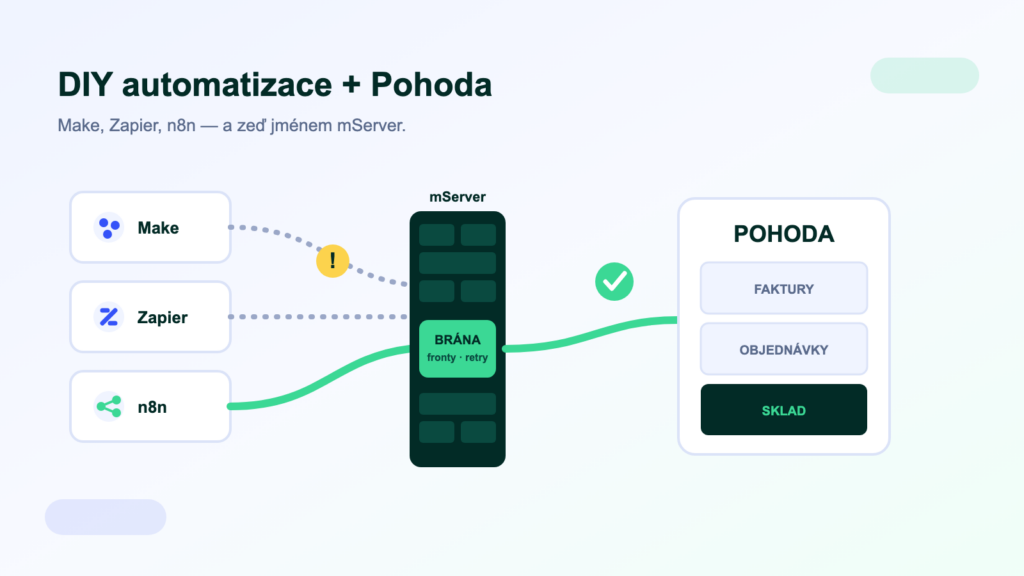
Automation platforms promise to connect anything to anything: a few clicks, no developer, the scenario runs. For cloud apps, that holds — so it is only a matter of time before someone at the company asks: “What about hooking up POHODA?” This article is the honest answer: what Make, Zapier and n8n can genuinely do with POHODA, where they hit a wall, and when a different tool is the better choice.
What Make, Zapier and n8n are great at
Make, Zapier and n8n are excellent at automating cloud applications. POHODA, however, is not a cloud app — its machine interface is mServer, which runs on your premises. DIY automation therefore suits notifications and one-way tasks that can tolerate a failure; reliable synchronisation of agendas needs an integration layer with queues and monitoring.
- MakeVisual scenarios with powerful data mapping. It started in the Czech Republic as Integromat, so it has a strong local community and good awareness of Czech applications.
- ZapierThe largest app catalogue and the lowest barrier to entry. At high volumes, though, paying per scenario step gets expensive fast.
- n8nA self-hosted, open-code tool (fair-code licence), a favourite of developers and, lately, of AI agent builders too. “n8n pohoda” is already showing up in searches — the community is experimenting.
Where DIY hits a wall with POHODA
All three tools assume a counterparty with a cloud API. POHODA is a desktop application — and that brings five hard obstacles:
- mServer runs on your premises, not in the cloud. POHODA’s official machine interface is a local service. For a cloud scenario to reach it, you have to expose it securely — a VPN, a tunnel or an authenticated gateway. “Opening a port to the internet” is not a solution, it is a security incident in the making.
- XML is not drag & drop. POHODA speaks its own XML document format. Building a correct invoice with VAT rates, cost centres and links means studying the documentation — exactly the work you hoped a no-code tool would save you.
- Licences and capacity. mServer needs a dedicated POHODA instance and a licence (CAL). Details in our article on mServer.
- No queues, no retries. When a scenario fails mid-transfer, you are left with half an order. DIY tools can rerun a scenario, but they don’t guard data consistency between systems — that is the job of an integration layer.
- Code lists and matching. Customers, stock cards, VAT rates — mapping code lists is 80% of the work with accounting data, and scenarios are a poor place to maintain it.
When DIY automation is enough
The key question is: what happens if a transfer fails once? If the answer is “nothing terrible”, you are in the territory where Make, Zapier and n8n shine:
- NotificationsA new invoice over 100 thousand CZK → a message to Slack or Teams. A failure doesn’t hurt, the value is immediate.
- One-way exportsOrders into a Google sheet for reporting, an overview for the weekly meeting — data flows one way, nothing is written back.
- Internal helpersDue-date reminders, e-mail summaries, watching for changes. Useful little things that don’t justify an integration project.
- PrototypesQuickly verify that a process makes sense — and only then build it properly.
When DIY is no longer enough
Automation is not integration
A workflow tool triggers tasks. An integration platform keeps data consistent: queues, retries on failure, monitoring, code list mapping, conflict resolution. Two-way synchronisation of orders and stock stitched together from scenarios is a ticking time bomb — it doesn’t crash spectacularly, it just quietly drifts apart, and you only find the differences at stocktaking. How to decide between a bridge, a scenario and a platform is covered in our guide to ERP integrations and our guide to connecting an e-shop.
And what about AI agents in n8n?
n8n has become a favourite tool for building AI agents — and this is where things come full circle. An agent is only as useful as its access to data. That is exactly what the MCP standard solves: a unified connector between AI and business systems, gradually being adopted by automation tools as well. Instead of hand-assembling XML, the agent gets ready-made, secured tools like “find overdue invoices”. Our MCP servers for ERP open up POHODA, Money, Helios and other systems this way — to assistants and agents alike.
Frequently asked questions
Does Zapier or Make have an official POHODA connector?
No. There are no official POHODA apps in their catalogues; community modules and HTTP templates exist, but their quality and maintenance vary. Always check who maintains a module and what happens when a new POHODA version comes out.
Is n8n free?
The self-hosted version has no licence fees (fair-code licence); you pay for running the server and your own time. n8n’s cloud version is paid. “Free” therefore only holds until you factor in the maintenance.
How do I expose mServer to the internet securely?
Never by opening a port directly. Use a VPN, an encrypted tunnel, or a gateway with authentication and IP whitelisting — and give mServer a dedicated account with minimal rights. Or leave the whole connection to an integration platform or a hosted solution.
When should I move from scenarios to an integration platform?
As soon as you need two-way sync, volumes grow, systems multiply, or there is no one left to maintain the scenarios. A good tell: a scenario that someone “prefers to check by hand every morning” is no longer automation.
Was this article helpful?
Thanks for the feedback!