A salesperson calls a customer with a new offer, not knowing the company has three invoices overdue. An accountant sets up a customer that sales won a week ago — by hand, with a typo in the company ID. Both situations have the same cause: the CRM and the ERP are two separate worlds. This article shows what to sync between Raynet and your ERP, the three ways to connect them, and where these projects get stuck in practice.
Short answer
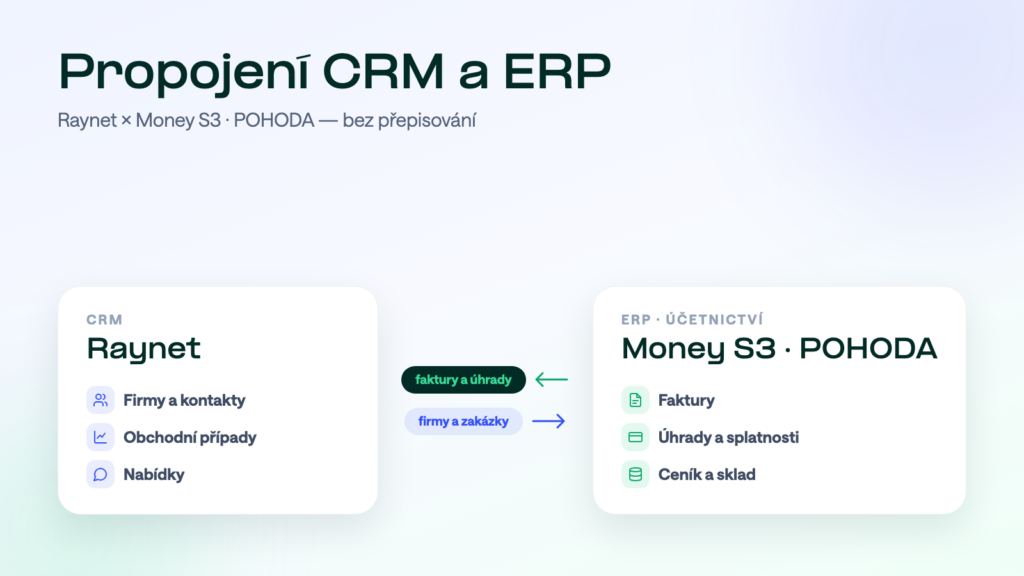
Let the CRM own the address book and the ERP own documents and the price list — and let invoices with payments flow automatically into Raynet while new companies and won deals flow into the ERP. Raynet has a public REST API, so you can connect it with an off-the-shelf connector, a custom script or an integration platform. You need a platform as soon as you want two-way traffic with matching by company ID and errors that report themselves — typically the moment your sales process starts depending on CRM data.
What to sync between CRM and ERP
The point of the integration is not to “sync everything” but to give each person the data they work with. In practice, four areas get synced:
- Companies and contactsA salesperson creates a company in Raynet and the customer appears in the ERP by itself — correct company ID, registry address, no retyping.
- Invoices and paymentsDocuments are issued in the ERP; on the company card in Raynet, sales sees revenue, open receivables and payment history before picking up the phone.
- Deals and ordersA won deal in the CRM turns into an order or job in the ERP — without a “please set this up” email.
- Products and price listsThe ERP owns the price list; Raynet offers current items and prices in quotes, not last year’s copy.
What Raynet offers to the outside
Raynet is a Czech cloud CRM and a grateful integration partner: it has a public, documented REST API — you generate access as an API key right in your instance settings, with no waiting for the vendor and no paid add-on module. The bottleneck is usually the ERP side: Money S4/S5 offer modern APIs, Money S3 opens up via XML data exchange and POHODA via mServer, which only ships with certain editions. The ERP therefore always dictates the architecture — Raynet adapts.
Path 1: An off-the-shelf connector
Ready-made connectors exist for the most common pairs — you will find them in Raynet’s integration catalogue and from specialised vendors. Deployment takes days, you pay a monthly fee, and the standard scenario works out of the box. The limit is the same as with every boxed solution: the mapping is fixed. It transfers what the connector was built for; the moment you want your own matching rules, want to filter which companies belong in the ERP, or need to sync the custom fields you tailored Raynet with, you hit the wall.
Path 2: A custom script over the API
Raynet’s API on one side, the ERP’s XML or API on the other — and a capable developer wires them together. Functionally that works, and for one-way transfers it is often the fastest route. The hidden cost is maintenance: the script has to handle request rate limits, retries on outages, structure changes after ERP updates and logging so an error can be traced at all. Above all, it has an author — and authors leave. A company integration only one person understands is a risk, not a solution.
Path 3: An integration platform
A platform has connectors for both Raynet and the ERP ready-made, and the build consists of configuring the mapping: what gets matched by company ID, when the CRM wins and when accounting does, which statuses get synced. Transfers run in a queue with automatic retries, every record can be traced in a log, and errors arrive as notifications — not as a phone call from a salesperson. With a third system (e-commerce, warehouse, Outlook) the difference grows: it plugs into the same hub instead of adding yet another standalone bridge. When each architecture pays off is covered in detail in our article on integration platforms.
- ConnectorA fixed scenario out of the box. Deployed in days, monthly fee, mapping cannot be bent.
- PlatformTailored mapping: matching by company ID, custom fields, filters. Built per data area, priced by scope.
- Custom scriptA fast start, but maintenance, API limits and the author leaving are your risk.
- PlatformA queue with retries, a log of every record and error notifications — the traffic watches itself.
The most common pairs in practice
Most often we connect Raynet with Money S3 — typically invoices with payments into the CRM and new companies the other way — and Raynet with POHODA, where editions and mServer come into play. The same logic applies to any CRM though: for example Zoho CRM with Money S5. For the view from the other side — what POHODA can do with various CRMs — see our separate guide; all supported pairs are in the integration catalogue.
What to check before going live
- One owner per data area. The CRM owns the address book, the ERP owns documents and the price list. When both edit the same field without rules, whoever synced later wins — and that is not a rule, that is a lottery.
- Match by company ID, not by name. “ACME Ltd” and “ACME, Ltd.” are one company to a human and two to a system. The registration number is the only reliable key; for contacts, the email address.
- Payments, not just invoices. Payment history is made of payments and due dates. A sync that stops at issued invoices tells sales how much you invoice — not who doesn’t pay.
- The initial history migration. Before daily traffic starts, existing companies must be matched once and document history backfilled. It is a separate project step — skip it and you will be matching duplicates in production.
- What happens on error. A company without an ID, an ERP outage, a document that fails validation. The right answer includes a queue, automatic retries, a notification and a log — “we’ll resend it manually” is not the right answer.
Trap: a two-way address book without rules manufactures duplicates
The most tempting brief — “just sync the address book both ways” — is also the most common source of trouble. A salesperson creates a company in the CRM, an accountant creates the same company in the ERP, each slightly differently, and the sync dutifully spreads both versions into both systems. The fix is to create records in one direction, match by company ID and have conflicts reported instead of silently overwritten.
How we do it at Symmy
We know Raynet up close — we build our own product for syncing Raynet with Outlook on its API, so we know how it behaves in daily traffic, not just in the docs. We build ERP integrations per data area (usually 6–12 hours of work per area), running with a queue, a log and 24/7 monitoring. What we can sync with Raynet is on the Raynet detail page; the pricing page with an online calculator estimates the cost of your combination.
Frequently asked questions
Does Raynet have an API?
Yes — a public, documented REST API. Access works via an API key you generate in your own instance settings, so the integration depends neither on the vendor nor on a paid module. The API is exactly how Raynet connects to ERPs, email and other tools.
How much does connecting Raynet to Money S3 or POHODA cost?
An off-the-shelf connector runs from tens of euros a month. A platform integration is priced per data area — the build usually takes 6–12 hours of work per area, plus a monthly fee for operation. The online calculator gives a concrete number for your pair.
Why can’t sales see invoices in the CRM?
Because invoices are created in the ERP and without an integration that is where they stay. The fix is an automatic sync of invoices and their payments onto the company card in the CRM — sales then sees revenue, receivables and payment history without begging accounting for data.
What does a well-configured address book sync look like?
Companies are matched by registration number (contacts by email), records are created in one clearly defined direction, and a conflict — say two different addresses for the same company — gets reported instead of one version silently overwriting the other.
Can AI work with the data around Raynet?
The most direct path available today leads through the ERP: Symmy MCP servers give AI assistants access to accounting system data — and with the CRM connected, sales data lands in the ERP too, where the AI can query it. Raynet itself has an open API, so it is well prepared for AI tooling.
Was this article helpful?
Thanks for the feedback!