As soon as you start connecting POHODA to the outside world — an e-shop, a POS system or an AI assistant — you run into the word mServer. Connector vendors require it, the documentation mentions it at every turn, and yet it is not entirely obvious what it actually is, what it costs and whether you need it at all. Let’s clear that up.
What is POHODA mServer?
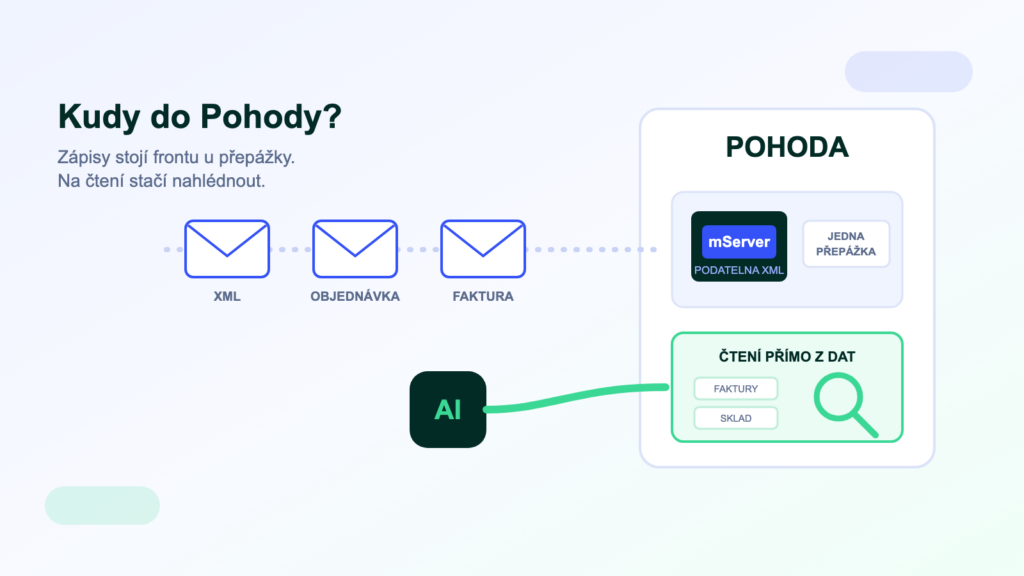
mServer is POHODA’s built-in “mailroom”: an HTTP server that accepts requests in XML format (create an invoice, list stock items…), hands them to POHODA for processing and returns a response. It is POHODA’s official machine interface — the channel other programs use to talk to it.
The maker describes the principle simply: a client sends a request to POHODA mServer, which processes it and sends a response back. One important technical detail: a running mServer reserves an entire instance of the POHODA program exclusively for communication. If an accountant wants to work manually at the same time, a second POHODA instance has to run on the machine. Stormware also recommends running mServer on a server operating system and only inside the internal network — never on a machine with a public IP address.
What mServer is used for
- E-shop connectorsOrders from the e-shop are written into POHODA; stock levels and prices travel the other way. The most common use — most e-shop bridges cannot work without it.
- POS systems and mKasaPoints of sale send documents into the accounts continuously, not in a single batch at the end of the day.
- Third-party applicationsCRM, warehouse systems (WMS), planning tools — anything that needs to write documents into POHODA or read its code lists through the official channel.
- Document automationBulk invoice creation, payment matching or generating orders from other systems.
What mServer costs
Here comes the most common misunderstanding: mServer is not bought separately — it is part of the POHODA program. That does not mean running it is free, though. The real costs are made up of the following items:
- A dedicated POHODA instance. A running mServer occupies one instance of the program all for itself. With network licences that in practice means budgeting for an extra licence so people can keep working normally.
- A machine that is always on. The recommendation is a server operating system on the internal network — in other words a server (physical or virtual) that someone manages and pays for.
- Setup and maintenance. Configuration, supervision, restarts after POHODA updates, dealing with timeouts. Small things that add up to hours of work every month.
- Connector implementation. mServer itself doesn’t connect anything — it is only a gateway. The connector between POHODA and your e-shop or other system is a separate item.
The exact implications differ by POHODA edition and licence type — check them with the maker or your vendor before deploying. The key point is that “free in the box” does not mean “free to run”.
When you need mServer
A simple rule: whenever another system needs to write into POHODA. E-shop orders, POS documents, invoices from a CRM — writes into the accounts should go through the official channel, which respects number series, VAT logic and document locks. That is exactly how we build system integrations ourselves: writes go through the official interface, because it is the only route the maker stands behind.
When you don’t need mServer
For reading data. Reports, overviews, questions like “who owes us what” — with the POHODA SQL and E1 editions, data can be read straight from the database, with no queue at the counter and no dedicated instance. It takes no performance away from the accountants, and POHODA doesn’t even know the reads are happening.
This is exactly the principle behind POHODA MCP — the AI assistant reads data directly, and mServer with its XML interface only comes into play for write actions. What an MCP server is and how it works is explained in a separate article.
Practical tips for running it
- Give mServer its own machine, or at least its own instance — sharing with the accountants leads to mysterious outages.
- After every POHODA update, check that mServer came back up — connectors fail silently.
- Keep it on the internal network; if a cloud service needs to reach it, handle access with a VPN or a tunnel, not a public IP.
- Set up availability monitoring — otherwise the first person to tell you the bridge is down will be a customer.
Frequently asked questions
Is mServer free?
As part of the POHODA program it carries no separate price tag. The costs arise around it: a dedicated instance (with network licences effectively an extra licence), an always-on machine and maintenance. Check the specific impact on your licence with the maker.
Does mServer work outside the E1 edition?
XML communication is available across POHODA editions; the E1 edition adds, among other things, automatic triggering of XML communication. Check availability for your specific edition in the Stormware documentation.
Will mServer slow the accountants down?
It runs as a separate instance, so it doesn’t block them directly. On a shared machine it does take its share of performance, though — hence the recommended dedicated server. Its request queue also processes jobs one at a time, which is worth bearing in mind with larger batches.
Do I need mServer for AI on top of POHODA?
Not for queries and overviews — with the SQL/E1 editions, reads go straight from the database. mServer (the XML interface) is only needed once the AI is supposed to write into POHODA, for example to issue an invoice with your confirmation.
Was this article helpful?
Thanks for the feedback!